
How to Download & Use the BetPro App from Play Store (2026)


If your friends keep talking about the BetPro app and you want it on your phone too, this guide will show you how. I will go one step at a time, in simple words. If you can use WhatsApp, you can use BetPro.
Before you start, keep a few things ready. You should be 18 or older. You need an Android phone with a little free space, a Google account (you already have one if you use the Play Store), and a steady internet connection. One more thing: betting rules are strict in Pakistan, so know the law and your own situation first, and only play with money you can afford to lose.
Download the App
The easiest way is to open this link on your Android phone. It takes you straight to the app page on the Play Store:
Download BetPro from Google Play Store
- Tap the link above. The Play Store will open.
- Check that the app name says BetPro. Fake apps with similar names exist, so always look first.
- Tap Install and wait a minute.
- When the button changes to Open, tap it. The app is ready.
Please do not download the app from random websites or WhatsApp links. Only use the Play Store link above.
Make Your Account
When you open the app for the first time, tap Sign Up. Type in your mobile number and choose a strong password. Do not use your birthday or “123456”. You will get a code by SMS. Type that code in, and your account is ready. Keep your password private. Nobody from BetPro will ever ask you for it.
The Dashboard
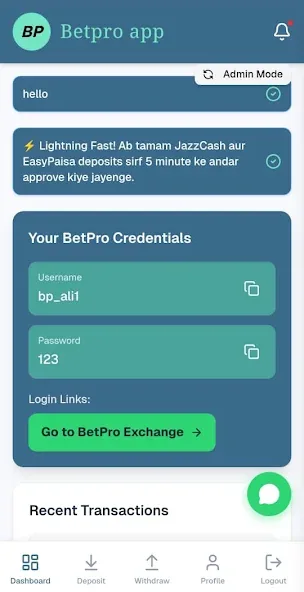
After you log in, you will see the dashboard. This is the home screen of the app. You can see your balance here, open the menu, and reach deposit, withdrawal and notifications. Take a minute to tap around and get comfortable. Just looking does not cost you anything.
How to Deposit
To start, you need to add money to your account. This is called a deposit. Open the Deposit option from the dashboard or menu.
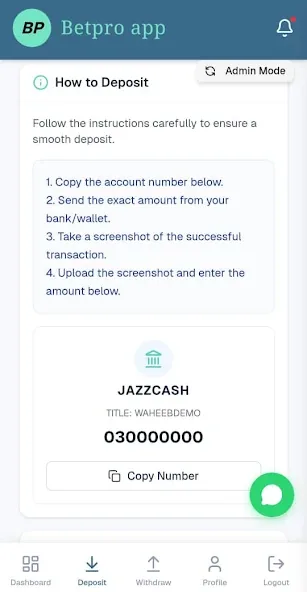
Choose the payment option that is easiest for you and type the amount. Start with a small amount the first time. After you pay, the app will ask for a few details, like your transaction ID, so it can match the payment to your account. Fill them in carefully and tap Submit.
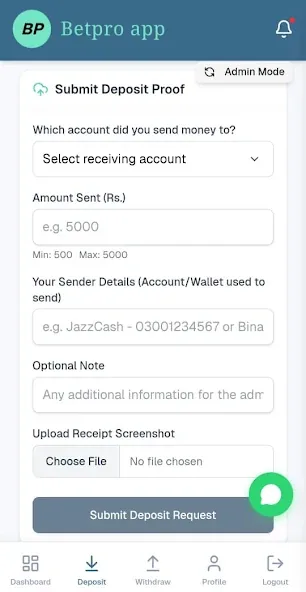
Then wait a little for your balance to update. If it does not show up, do not send the money again. Contact support with your transaction ID instead. Also, only use the payment details shown inside the app. Never send money to a number someone gives you in a chat.
How to Withdraw
Open the menu and tap Withdraw (or Request Withdrawal). Type the amount, add the account where you want to receive your money, and check every number twice. One wrong digit can send your money to the wrong place. Then tap Submit.
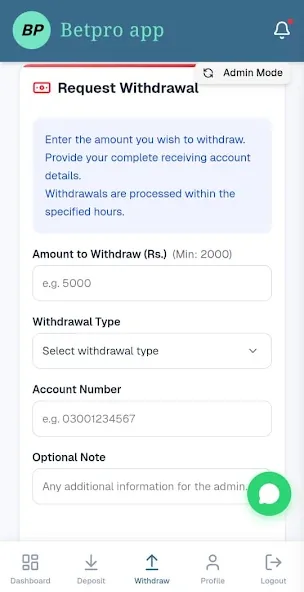
Your request will be checked first and then sent to you once it is approved. This can take a little time, so please be patient. It also helps to use an account in your own name, because a different name can cause delays.
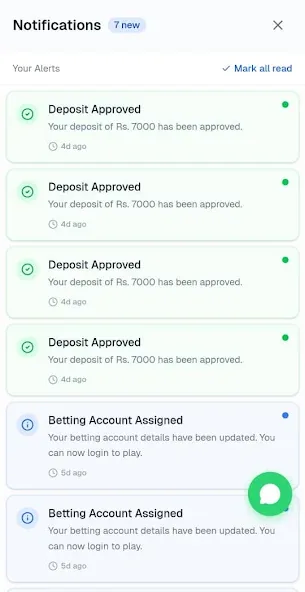
Notifications
Do not skip this part. The notifications page tells you when your deposit is approved and when your withdrawal is on its way. Turn notifications on in your phone settings so you do not miss anything.
Tips to Stay Safe
- Decide how much you can spend each week and stick to it.
- If you lose, do not bet more to win it back.
- Never share your login with anyone, not even someone who says they are from support.
- Keep the app updated from the Play Store and lock your phone with a PIN or fingerprint.
- Take breaks. If it stops being fun, stop.
If the app does not install, check your free space and internet, then restart your phone and try again. If you do not get the SMS code, wait a minute and ask for a new one. If you forget your password, use the Forgot Password option on the login screen.
That is all you need. Install the app, make your account, add a small deposit, learn the dashboard, and ask for a withdrawal when you want your money out. Keep it simple, keep it safe, and play only for fun.
Free Android app
Get BetPro on your phone
Deposits, withdrawals and support, all in one fast, secure app.
